
Skip to main content
How Can We Help?
Search for answers or browse our knowledge base.
Steps:
- Ensure the washer is in Manual Mode
-
Open the Programming Menu:
- Press the NORMAL WARM (∧) or DELICATES COLD (∨) button repeatedly until “Prog” appears on the display.
- Press the START (enter) button. The display will show “AtS”.
-
Select Default Cycle Option:
- Use the NORMAL WARM (∧) or DELICATES COLD (∨) button to scroll through options until “dCyC” appears on the display.
- Press the START (enter) button.
-
Choose Your Cycle:
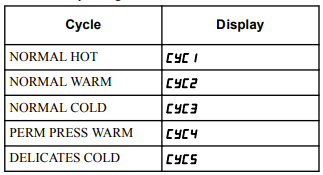
- A number will appear on the display (current default cycle). Refer to the table below to find the corresponding cycle and its number. The corresponding LEDs will also be lit.
-
Change the Default:
- Use the NORMAL WARM (∧) or DELICATES COLD (∨) button to choose the desired default cycle number from the table.
-
Save and Exit:
- Press the START (enter) button to confirm the new default cycle. This value is saved and the next programming option will appear.
You must be logged in to post a comment.