
Skip to main content
How Can We Help?
Search for answers or browse our knowledge base.
Before you Begin:
- Washer must be in Manual Mode
Steps:
- Use the PERM PRESS/WARM (∧) or DELICATES/COLD (∨) buttons to choose PrOg and press Start.
- Select CnFg with the buttons and press Start.
- A number will appear (e.g., 123). This number is the current configuration value.
- Use the buttons to choose the desired code from the tables below and press Start to confirm.
Exiting Programming:
- Ensure the display shows a programmable option, not a value.
- Hold the NORMAL/HOT button and press the NORMAL/WARM button with the other hand.
- The washer will return to the previous mode.
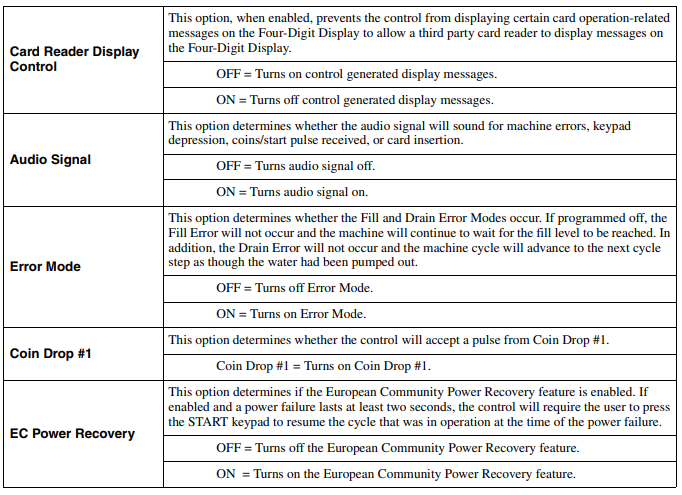
The following information is for Software versions S006 and lower
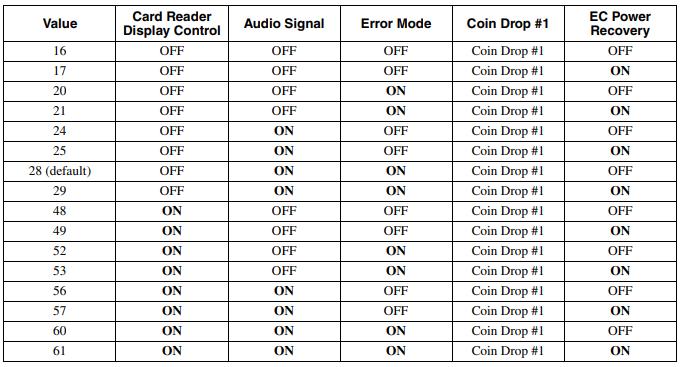
The following information is for Software version S007
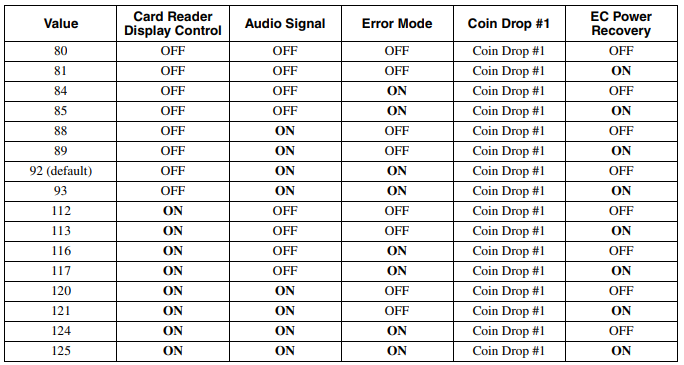
The following information is for Software version S008
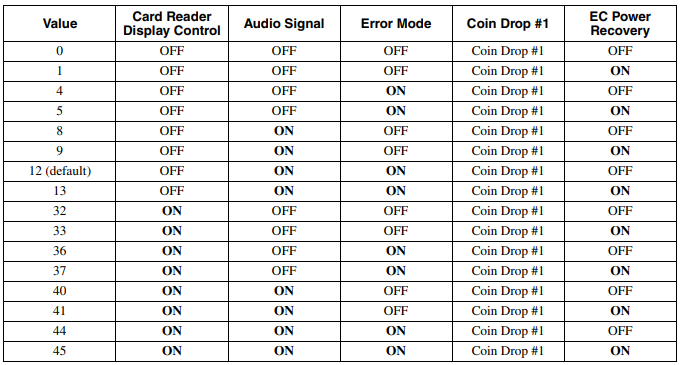
You must be logged in to post a comment.