
Skip to main content
How Can We Help?
Search for answers or browse our knowledge base.
This feature lets you retrieve audit information stored by your machine including the following options:
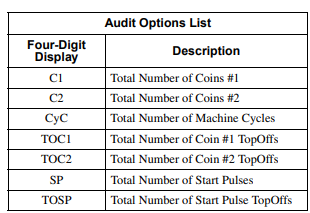
There are two ways to get into Audit Mode
Through Manual Mode:
- Enter Manual Mode: Refer to “Entering Manual Mode“
- Press LOW TEMP (∧) or DELICATES (∨) until “AUdt” appears in the Four-Digit Display.
- Initiate AUdt: Press START (enter). “C1” will appear in the display.
By Opening the Coin Vault: *This method may not work if you machine is in OPL mode*
- Open the coin vault.
- For software versions S003 or higher, the service door must be closed
- Press START (enter). This should initiate the Audit Feature.
To Read Audit Data:
- Scroll through options: Use LOW TEMP (∧) or DELICATES (∨) to browse the available audit options. Refer to the table above for descriptions of each option.
- View audit count: When the desired option is displayed, press START (enter) once to view its four-digit audit value.
- Move to next option: Press START (enter) again to advance to the next audit option.
- Repeat: To view other audit counts, repeat steps 1-3.
To Exit Audit when using Manual Mode:
- Ensure an option is displayed: Make sure the Four-Digit Display is showing an audit option, not a numerical value.
- Press and hold HIGH TEMP and MED TEMP: Press and hold both these keypads simultaneously for a moment. Release the buttons and the control will return to its previous mode of operation.
To exit Audit when using the open coin vault method, just close the coin vault.
You must be logged in to post a comment.