
Skip to main content
How Can We Help?
Search for answers or browse our knowledge base.
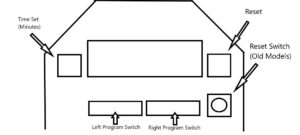
- Move switch # 4 on the left bank of dip-switches to the “on” position.
- “10:00” (or other preset time) will appear on the display. This is the additional time in minutes.
- Press HIGH TEMP (+) or LOW TEMP (-) to change the time.
- Move switch # 4 back to the “off” position to save this value and turn the display off.
You must be logged in to post a comment.